MoBill Budget and Reminder
- 4.0
- Rating
- 500.00K
- Installs
- Free
- Price

 Analysis by App-foxy
I approached MoBill Budget and Reminder as a practical personal-finance tool rather than a full banking replacement. Its purpose is straightforward: help me keep track of everyday money commitments and make a budget easier to follow. That focus is useful because many people do not need investment charts or complicated financial dashboards; they need a clear place to remember what must be paid and understand where their money is going.
After using it, my impression is that MoBill Budget and Reminder works best as a lightweight companion for routine financial organization. It is an Android finance app from MoBill Apps, available free of charge, with optional in-app purchases ranging from a few dollars to just under eleven dollars per item. The app is rated for Everyone, runs on Android 8.0 and later, and its current version is 5.3.1. Those details make it approachable for people using older phones, although the experience still depends on how much information you enter and how carefully you maintain it.
How MoBill Budget and Reminder feels in everyday use
The first thing I noticed is that the app’s value comes from regular habits, not from a single impressive screen. A budgeting app can only help if I record expenses consistently and check upcoming obligations before they become urgent. MoBill Budget and Reminder is suited to that rhythm: enter the financial information that matters, return to it often, and use the reminders as a prompt to stay ahead of recurring responsibilities.
You May Also Like

 Blood Strike: 2.5 Anniversary
Blood Strike’s Loadouts Turn Every Drop Into a Tactical Gamble
A close look at Blood Strike’s custom loadouts: how fast access to signature weapons reshapes its battle royale rhythm, rewards preparation, and narrows the gap between fights.

 Pandora - Music & Podcasts
Pandora’s Music Is Easy to Start, but Harder to Recover
Pandora’s strength is its low-effort path from a seed to a station. Its weak spot is how much confidence it asks you to place in connection, setup, and quiet recovery.

 8 Ball Pool
 Is Built on Rivalries, Rematches, and Routine
A close look at the rivalries, rematches, shared routines, and unanswered safety questions that turn a quick pool match into a persistent mobile community.

 Samsung Music
’s Quiet Strength Is Playing What You Already Own
Its reach comes less from spectacle than from dependable access to a personal library. That simplicity is both the app’s strongest retention engine and its ceiling.

 AccuWeather: Weather Radar
AccuWeather Review: A Quick, Clear Forecast for Everyday Decisions
For everyday plans, the best forecast is the one you can understand quickly. AccuWeather makes rain timing, radar, and local conditions easy to act on, with a few trade-offs.

 Hill Climb Racing
Why Hill Climb Racing Still Turns Crashes Into One More Run
A tiny car, a bumpy hill and one more upgrade: Hill Climb Racing keeps resurfacing because its simple chaos makes every near-miss feel personal.
More From Our News Desk



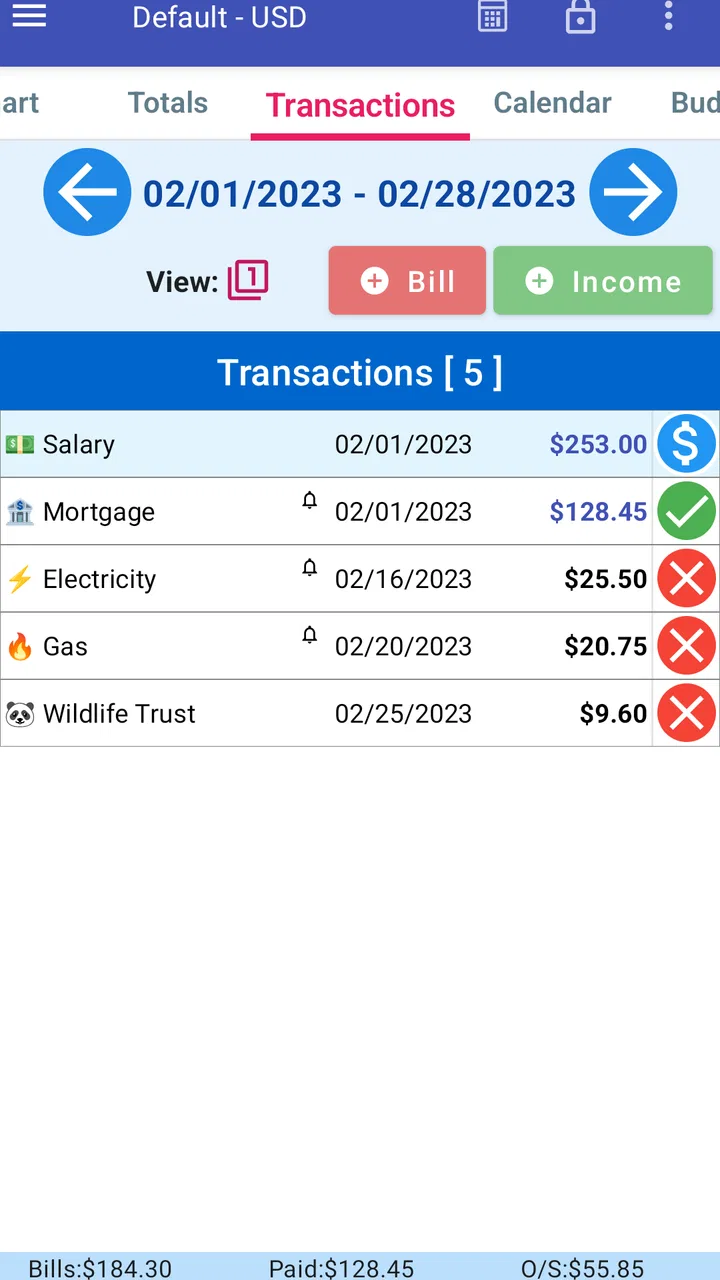
A realistic example is a busy month when rent, utilities, a phone bill, subscriptions, transport costs and groceries all arrive at different times. Without a dedicated system, I might remember the largest payment and overlook a smaller one. With MoBill, I can use the budgeting side to give the month a shape and the reminder side to keep individual commitments visible. That combination is more useful than a simple notes app because the information is organized around money rather than scattered through unrelated notes.
I would not describe the app as a replacement for a bank application. It is better viewed as a personal record and planning layer. My bank shows transactions and balances; MoBill helps me think about what those transactions mean in the context of a household budget. That distinction matters. Anyone expecting automatic account synchronization, advanced investment analysis or a complete financial-planning suite may find the experience too limited. Someone who wants a focused way to remember bills and monitor spending may appreciate the smaller scope.
Speed expectations on a modest Android phone
For a finance app built around personal entries and reminders, I expect quick movement between screens and low overhead. MoBill’s relatively focused purpose works in its favor: it does not need to present a large media library or process demanding visual content. In normal use, the important performance question is less about dramatic speed and more about whether entering a payment or checking a budget feels like a chore.
My advice is to keep the first setup deliberately small. Begin with the bills and spending categories that affect your month most, then add detail after the routine feels comfortable. This is not only easier to manage; it also makes the app feel more responsive because I am not turning the initial session into a large data-entry project. A budget tool becomes less useful when the user spends more time designing a perfect system than actually reviewing it.
The app’s age is also relevant. It was released on February 28, 2011, so its identity comes from a long-running, practical approach rather than from the newest visual trends. That can be a positive for users who prefer a direct utility, but people accustomed to polished modern finance dashboards may find the presentation less immediately engaging. I would judge it by how quickly it supports a habit, not by whether it resembles a contemporary banking app.
What happens when the budget gets busy
The demanding moments are likely to come from human workload rather than from graphics or complex calculations. A user managing many bills, several spending categories and frequent adjustments has more opportunities to enter inconsistent information. The app can organize what I give it, but it cannot correct a forgotten expense or an incorrectly recorded amount. That is the central trade-off of a manual budgeting tool: more control and privacy in the record, but more responsibility for keeping it accurate.
I found a useful workflow in separating fixed commitments from flexible spending. Fixed items are the payments I expect to face regularly, while flexible items include food, travel and unplanned purchases. Looking at them separately makes the budget more informative than placing every expense into one long list. It also helps me identify why a month feels tight: the problem may be a large unavoidable bill, or it may be several small discretionary purchases that quietly accumulate.
Another practical approach is to review the app at two different times. A quick check before the month begins helps me see upcoming obligations. A second, shorter review after several days helps me compare the plan with what actually happened. Waiting until the end of the month turns the app into an archive; checking earlier gives it a chance to influence my decisions. This is one of the strongest reasons to use the reminder function instead of relying on memory alone.
Heavy use can also expose a limitation: detailed tracking demands patience. If I want a fully categorized record of every small purchase, I need to create that discipline myself. For some users, a bank app with automatic transaction imports will be more convenient. MoBill is a better fit when I am willing to enter or review information manually in exchange for a simple, intentional overview.
Reliability, reminders and recovery habits
Reliability in this kind of app has two meanings. First, the application needs to open and display my financial notes consistently. Second, the reminders need to support a dependable routine. I would not treat any reminder as a substitute for checking an actual account or bill statement, but it can reduce the chance that an ordinary obligation disappears from my attention.
I recommend using clear names for reminders rather than vague labels. “Electricity” is more useful than “payment,” especially when several commitments fall in the same week. Adding enough context to distinguish similar bills also makes later reviews easier. The goal is not to write a paragraph for every entry; it is to make each item recognizable when I am looking at it quickly.
Recovery is another area where a cautious habit helps. Before making major changes, I would review the current entries and avoid treating the app as the only place where important financial information exists. A budgeting record is valuable, but it should not be the sole source for account numbers, official due dates or proof of payment. I use MoBill to plan and remember, while retaining official records elsewhere.
That approach also protects against a common budgeting mistake: assuming that a reminder means a payment has been completed. A notification can tell me to act; it cannot prove that the bank processed the transaction. After paying a bill, I would mark or update my own record only after confirming the payment through the relevant provider. This small separation between planning and confirmation keeps the budget more trustworthy.
Older devices and practical constraints
MoBill supports Android 8.0 and newer, which gives it a useful reach across older Android hardware. That matters for a finance app because many people prefer to keep an older phone for basic tasks rather than replace it simply to run a budgeting tool. If the device meets the minimum operating-system requirement, the app is at least positioned for that kind of practical use.
Still, operating-system compatibility is not the same as a guaranteed identical experience on every phone. Screen size, Android manufacturer changes and the general condition of a device can affect how comfortable data entry feels. On a smaller or older handset, I would keep entries concise and avoid trying to build an overly elaborate category structure. A finance tool should reduce friction, not turn a phone into a spreadsheet that is difficult to navigate.
Resource demands are best considered in context. This is a focused finance app, so I would expect ordinary budgeting and reminder work to be less demanding than media-heavy applications. I would not claim that every device will behave identically, but the app’s narrow purpose is encouraging for users who want something practical rather than resource-intensive. The more important constraint is the user’s time and attention: a system that requires too much maintenance will eventually be ignored, regardless of how capable the phone is.
The free entry point is helpful for trying the workflow before committing to it. Optional purchases are available, with individual items priced from $2.50 to $10.99. I would test the basic routine first and decide later whether paid additions are worthwhile for my needs. That is especially sensible for a personal-finance app, where the real benefit comes from sustained use rather than from collecting every available option.
Who will benefit most from it
I think MoBill Budget and Reminder is a good match for someone who wants a dedicated place for household budgeting and bill reminders without moving into complex financial software. It can suit a student learning to manage recurring costs, a renter organizing monthly commitments, or a family member who wants a clearer view of where money is allocated. The Everyone age rating also makes it broadly approachable, though financial accuracy still depends on the person using it responsibly.
It is particularly useful for people whose main problem is forgetting rather than calculating. If I already know my income and expenses but regularly miss a due date, reminders address a real weakness. If I know when everything is due but cannot see how spending is distributed, the budget side is more valuable. Using both together creates a simple loop: plan the month, remember the commitments, then compare the plan with reality.
The app may also work well for couples or families if one person takes responsibility for maintaining the record and everyone agrees on the categories. It is less suitable when several people need live, shared editing or when the household depends on automatic synchronization across financial accounts. In those situations, a collaborative finance service may save more time, even if it offers a more complicated interface.
I would skip it if I want sophisticated financial automation. Users who need investment tracking, detailed reporting, automatic bank feeds or advanced forecasting should look for a specialized alternative. I would also skip it if I know I will not enter expenses or review reminders. No budgeting app can compensate for a complete lack of participation, and a visually attractive tool with automatic imports may be a better choice for someone who wants minimal manual work.
How it compares with familiar alternatives
Compared with a paper notebook, MoBill has the advantage of putting budget planning and reminders in one digital routine. A notebook can be flexible and private, but it cannot prompt me in the same way. Compared with a generic notes app, MoBill is more purpose-built for money, which reduces the need to invent a structure from scratch. Those are meaningful benefits for a person who wants basic organization without building a personal spreadsheet.
Compared with a spreadsheet, the choice is less obvious. A spreadsheet offers more freedom for formulas, custom reports and unusual financial situations. It can be the better option for someone who enjoys designing a detailed model. MoBill is more appealing when I want a ready-made budgeting habit and do not want to spend time maintaining formulas or formatting. The trade-off is that I accept a narrower framework in exchange for less setup.
Compared with a bank’s own application, MoBill serves a different purpose. The bank app is the authority for actual balances and processed transactions, while MoBill is useful for intention, planning and reminders. I would use both rather than choosing one as a universal replacement. The practical benefit comes from checking the budget before spending and checking the bank after transactions, instead of assuming either view tells the whole story.
My performance verdict after sustained use
MoBill Budget and Reminder earns its place through focus. It does not need to overwhelm me with financial terminology to be useful; it needs to help me remember obligations and keep a workable plan in front of me. The app has reached over 500,000 installs and holds a 4.0 average from around 3,800 ratings, which suggests that many users find value in this straightforward approach. I see those figures as a sign of a practical audience rather than proof that it will suit every budgeting style.
Its stability and speed are most convincing when I keep the workflow realistic: record the important items, use recognizable labels, review the month before it becomes urgent, and confirm completed payments through official sources. The app is not a magic financial assistant, and manual organization remains its main limitation. That limitation is acceptable for me because it also leaves the budget under my control instead of hiding the process behind automation.
The long-term question is whether I will return to it. A budgeting app that is opened briefly and consistently is more valuable than a powerful one abandoned after an ambitious first setup. MoBill’s focused design encourages that kind of repeat use, especially for people whose priorities are recurring bills and everyday spending rather than advanced financial analysis.
My recommendation is therefore fairly specific: choose MoBill if you want a free, focused Android tool for personal budgeting and reminders, and if you are comfortable taking responsibility for entering and checking your information. Try the basic workflow before considering the optional purchases, keep official payment records separate, and do not expect bank-level automation. For that audience, it is a sensible and approachable finance companion from MoBill Apps. If your priority is simple financial awareness rather than complex automation, this is where the app makes the strongest case for itself.
FAQs for MoBill Budget and Reminder
01What is MoBill Budget and Reminder used for?
MoBill Budget and Reminder is designed to help you organize personal finances by recording bills, tracking recurring payments, and receiving reminders before due dates. It can be useful for monitoring household expenses, subscriptions, rent, utilities, loans, and other regular commitments. By keeping payment information in one place, the app may help you avoid missed deadlines and maintain a clearer view of your monthly budget.
02Can I use MoBill Budget and Reminder to track recurring bills and subscriptions?
Yes, the app is primarily useful for recurring financial obligations such as rent, phone plans, streaming services, insurance, memberships, and utility bills. You can generally enter the payment name, amount, frequency, and due date, then use the reminder feature to stay informed. However, you should review each entry carefully, especially when a bill has a variable amount or changes its billing schedule.
03Does MoBill Budget and Reminder connect directly to my bank account?
MoBill Budget and Reminder should not be treated as a full banking or automatic account-aggregation service unless the current app listing specifically confirms those features. Its main purpose is typically manual organization of bills, reminders, and budget information. Users who want automatic transaction imports, bank synchronization, or real-time account balances should check the latest description, permissions, and supported integrations before downloading.
04Is my financial information safe when using MoBill Budget and Reminder?
Before entering sensitive information, it is important to review the app’s privacy policy, permissions, data-storage practices, and developer details on Google Play or the App Store. Avoid adding bank passwords, card PINs, or unnecessary personal data unless the app clearly explains how that information is protected. Using a device lock and keeping the application updated can also reduce avoidable privacy and security risks.
05Is MoBill Budget and Reminder free, and are there any limitations?
The availability of free features, advertisements, premium tools, or in-app purchases can vary depending on the platform and the current version of MoBill Budget and Reminder. The basic functions may be enough for simple bill tracking, while advanced options could require payment. Check the official store page before installing to confirm pricing, subscription terms, supported devices, and whether reminders or budgeting features are limited in the free version.
Pros
- Simple interface makes budgeting easy for beginners.
- Recurring bill reminders help prevent missed payments.
- Supports tracking income
- expenses
- and upcoming obligations.
- Useful calendar view for seeing payment dates at a glance.
- Can encourage better spending awareness without complex tools.
Cons
- May lack advanced reports for detailed financial analysis.
- Manual entry can become time-consuming for frequent transactions.
- Reminder reliability may depend on notification permissions.
- Limited sharing options may not suit household budgeting.
- Users should review privacy details before entering financial data.

MoBill Budget and Reminder
Gallery